2009年10月31日 星期六

[武術]西螺大橋文化節一些心得


 今天去了西螺大橋文化節幫忙,

也學習並且更正一些觀念與動作。

如 手的外柔內剛

 閃身 

出拳到最後再轉。

etc.先消耗完在處理。


2009年10月25日 星期日

[武術]一些心得筆記


很久沒有掛上這個tag 武術。

我想要漸漸的把在北京學習,
在西螺學習的歷程都紀錄下來。

過去的事情只能回憶,
希望有另外一個高峰經驗。

其實西螺家鄉,
有許多武術能人,
等待一個機緣。

傳統武術等待傳承與發揚!


2009年10月24日 星期六

[記事]台灣光復節


10月25日是台灣光復節,
這個日子。

對很多人來說,都有重大的意義。


那一天台灣有了多少改變!

現在,
過去,
都變成歷史。

學生大概只有沒了國定假日的放假,

就遺忘了這個節日了吧。


2009年10月23日 星期五

計算使用mem


ps aux | awk '$1 == "reddybs" {sum +=$4}; END {print sum}'

2009年10月22日 星期四

[VirtualBox]


VirtualBox can't operate in VMX root mode. Please disable the KVM kernel extension, recompile your kernel and reboot (VERR_VMX_IN_VMX_ROOT_MODE).

2009年10月18日 星期日

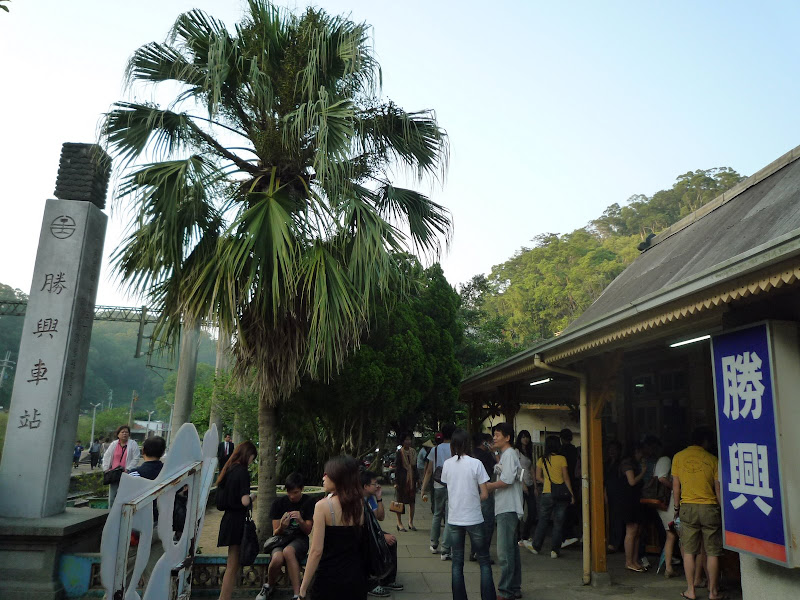
[旅遊]苗栗三義 勝興車站 不遠山莊


http://picasaweb.google.com/peichengpic/1017#   相簿在這裡


昨天(091017)跟HPC的學長們約好,

我們一起到苗栗不遠山莊去,

關心一下小弟弟小妹妹的系露。


打從看過五月雪之後,

就一直對苗栗的油桐花,

有一種莫名的吸引力。


我們約定中午後出發的,

joe AD 小胖 們早已在HPC等候了,

我過去後打電話給皮皮


我們大概兩點多出發。


一路經過要到大甲的路上,

讓我想起以前的總總,

之前,ZZ載我,走過的這條路,

想想已經,三年了,

真是歲月催人!


車過清水,

這個風真的是有夠大的啦!


我們一路到了大甲前,

沒想到joe跟皮走不同路,

害我都不知道要跟誰走了。


幸好皮在前面等,

不過到了苗栗的時候,

皮皮車的皮帶斷了,

但是他叫我們先走,

我們跟著joe走,結果誤打誤撞的到了勝興車站,


嘿嘿,就是五月雪那個,

不過這個時節沒有油桐花,

聽說這邊可以看螢火蟲,

沒想到這邊遇到了學弟阿財。

他們也要去系露,

他跟我告辭就走了。


我們到勝興車站的目的就是看看而已XD

順便買吃香腸吃。(only me)


真懷念在大陸出去玩的日子阿!


接著往上騎,

想不到我們騎到一條繞著山頭的路。


不遠山莊,真的很遠。


來回幾次我們終於到了。


我們到了就持續阿魯巴,

一些NMG成員,

但是學弟妹跟隊輔們都不熱絡,不好玩。


晚上,joe跟皮化身為營火管理員

他們兩個在那邊顧營火Orz


我們十點半就先離開了,

之後大甲吃小吃,

吃了鴨肉麵線跟綠豆沙,

回到東海的時候才12點半而已。


晚上的山風,真冷。

2009年10月13日 星期二

無法完成操作。列印多工緩衝處理程式服務並未執行。


無法完成操作。列印多工緩衝處理程式服務並未執行。

新增pdf creator

出現的狀況


1.進入 [控制台]--[系統管理工具]--[服務]--[Printer Spooler] 服務,然後將啟動類型變更為 [自動]。 

2.手動執行cmd 
net stop spooler 
del %SystemRoot%\system32\spool\PRINTERS\*.* 
net start spooler 

3.開始--執行--net start spooler 
啟動「多工緩衝處理程式」服務


2009年10月8日 星期四

開會開會開會


今天開了N多抽象的會,

最近真的愈來會聽很多話聽不下去,

很多學生都開始不該學生擔心的事情,

我覺得學生 之所以難能可貴,

正因為他可以毫無拘束的思考跟創造,

不要讓舊的規定囿於自己。

今天開會,

第1 很多事情不再重點上,

很多人為了自己想的事情,

而且他們不是主要事件者,

造成事情的誤導。

第2自己使用自己的意思去揣摩,

而不是原始資料,

造成資訊不對稱。


2009年10月7日 星期三

人生能有幾回搏


時間過的超快的,

  
有實非必要的為了別人的事情干擾自己的行程。 

  
只不過是對事情漫不關心一點, 

 思考多一點, 

 每天十點後,

 甚至十一點才拖著疲累的身體回到房間。 

 有時候, 想想兩周前,我都是可以睡到中午自然醒,

  現在,怎麼變成日間部的小孩。 

 一下連自己的大事都壓過來了, 原來推甄的日子到了, 

 時間悄悄的過, 日子就在下禮拜開始, 

 推甄,網站,棟長,CS 2.0,武術。。。 還有許多! 

 人生能有幾回搏! 

 希望為這個時候留個註腳。

2009年9月28日 星期一

[GungFu]武術的追求


今天(星期一)下午到了老師那邊,
順便聊了一下北京半年的見聞。

真的讓我大開眼見也增廣許多見聞,
也讓我知道什麼內裡的東西。
 
說真的練武這種東西,
是講求機緣的,
不可強求的。

今天累了明天補齊。

2009年9月26日 星期六

[Gentoo]openbox快捷鍵 LXDE


Keyboard shortcuts


Openbox default key combinations


  • Alt-F4 Close the active window

  • Alt-Space Show the client menu for the active window

  • Alt-Tab Cycle between windows on the desktop

  • Alt-Shift-Tab Cycle between windows on the desktop in reverse order

  • Control-Alt-Tab Cycle between panel and desktop windows on the desktop

  • Windows-D Hide all windows to show the desktop

  • Windows-E Run the Konqueror file manager (This is an example of how to run a program with a key binding)

  • Alt-Escape Lower the active window behind other windows, and activate the last window that was in use

  • Windows-F1 Go to the first desktop instantly

  • Windows-F2 Go to the second desktop instantly

  • Windows-F3 Go to the third desktop instantly

  • Windows-F4 Go to the fourth desktop instantly

  • Control-Alt-Left Open the desktop switching dialog, to go to the desktop to the left of the current one

  • Control-Alt-RightOpen the desktop switching dialog, to go to the desktop to the right of the current one

  • Control-Alt-Up
    Open the desktop switching dialog, to go to the desktop above the
    current one (This will only be useful if you use a pager to set up a
    desktop layout with multiple rows)

  • Control-Alt-Down
    Open the desktop switching dialog, to go to the desktop below the
    current one (This will only be useful if you use a pager to set up a
    desktop layout with multiple rows)

  • Shift-Alt-Left
    Open the desktop switching dialog, to go to the desktop to the left of
    the current one, and bring the active window with you

  • Shift-Alt-Right
    Open the desktop switching dialog, to go to the desktop to the right of
    the current one, and bring the active window with you

  • Shift-Alt-Up
    Open the desktop switching dialog, to go to the desktop above the
    current one, and bring the active window with you (This will only be
    useful if you use a pager to set up a desktop layout with multiple
    rows)

  • Shift-Alt-Down
    Open the desktop switching dialog, to go to the desktop below the
    current one, and bring the active window with you (This will only be
    useful if you use a pager to set up a desktop layout with multiple
    rows)

  • Alt-Left mouse button Move a window

  • Alt-Right mouse button
    Resize a window. The window is resized towards the edge that the mouse
    is nearest to. So use Alt-Right mouse button in the top right corner of
    a window to resize that corner.

  • Alt-Scroll wheel Change desktops forward and backward


參考
http://wiki.debian.org/Openbox

[Gentoo]dindin-pdf


走冰大神寫了隻pdf viewer
再很平凡無奇的pdf投影片也會搖身一變成為眾所矚目的焦點。

從google code svn下 源碼

svn checkout http://dindin-pdf.googlecode.com/svn/trunk/ dindin-pdf-read-only

然後 裏面有隻autugen.sh
他會幫你產生一些make的變數如果你環境都符合的話
應該一下就跑出來了

基本上是要有opengl 跟poppler
在gentoo下先編完xpdf跟poppler-glib
手動建立 m4 dir
如果有Makefile.am
就用automake產生Makefile.in
./configure 使用Makefile.in
產生Makefile
在make就會在src下編譯出 dindin


[Gentoo]LXDE使用xcompmgr transset 達到透明


emerge xcompmgr

emerge transset


xcompmgr -c -t-5 -l-5 -r4 -o.55 &


$ transset  .5          # 例子为实现50%透明。

$ transset  .3          # 实现30%透明


這樣就可以達到視窗透明了


2009年9月25日 星期五

[gentoo]使用google chrome


关于Google Chromium和Google Chrome的关系请看这里。所以呢,叫Chromium比较好。

偶前天说写个google chromium的ebuild,但是木时间哈,所以今天看看ebuild how to才写完。

这是Shellex第一次写ebuild哦,里面用到了curl来获取最新的版本号。不知道可以不可以,因为不知道如何用wget做到一样的功能。所以请保证安装有curl,有什么不对的地方还请大家见谅喽,可以直接告诉我。

嗯,现在用gentoo的同学,不用编译也可以用上最新的Google Chromium的开发版快照了!

首先,下载这个文件[右键另存: google-chromium-bin-9999.ebuild]。放到你的本地portage的某分类下。比如我放在是/usr/local/portage/www-client/google-chromium-bin/

当然啦,Shellex不保证上面那个下载链接是最新的。如果有变化,请移步Shellex-overlay,在那儿可以找到Shellex用的最新ebuilds.

接下来请执行:

# ebuild google-chromium-bin-9999.ebuild digest
# emerge google-chromium-bin

如果没有错的话,chromium就安装完毕了。执行

$ chromium-bin

可以启动它啦。以后想用最新的Chromium, 只要emerge google-chromium-bin就可以啦
BTW: 当然版本2.0.177.0 (14518),支持Tab拖动了。

轉載
http://linuxdesktop.cn/2009/04/27/use-latest-google-chromium-without-compile-the-source-code.html

[Gentoo]pcmanx libpcmanx_core.so.0: cannot open shared object file: No such file or


layman 裡的pcmanx-gtk2不能編譯成功
似乎跟我的firefox是bin的關係
有個萬掛是firefox的

所以從從svn取回code

# ./autogen.sh
# ./configure
# make ; make install

發現

在终端里运行pcmanx 告诉我pcmanx: error while loading shared libraries:
libpcmanx_core.so.0: cannot open shared object file: No such file or
directory

用root執行ldconfig
就可以了

[gentoo]安裝與lxde


前幾天把硬碟整理完,
Windows下的工作也先告一段落了。

趁星期五開始重新我的Gentoo生活
使用LXDE

看著quick install的文件 很快就把基本的系統安裝好了.
LXDE 還有一些微調問題.

http://en.gentoo-wiki.com/wiki/LXDE


佈景圖示設定不正確的錯誤提示

這通常表示你沒有執行 XSETTINGS manager。 GNOME 或 XFCE 這類的桌面環境,會自動執行它們的 XSETTING managers,像是 gnome-settings-daemon 或 xfce-mcs-manager。

如果裝GDM的使用者, 可以將 "@gnome-settings-daemon" 放在 "/etc/xdg/lxsession/LXDE/autostart" 這個檔案裏面

但如果你不是用這些桌面環境,則你有兩個選擇:

1. 執行 XSETTINGS manager,或是

2. 在 ~/.gtkrc-2.0 這個檔案裡面指定你的圖示佈景主題

舉例來說,如果你想用 Tango 這個圖示佈景主題,只要在你的 ~/.gtkrc-2.0 裡面加入這一行:

gtk-icon-theme-name="Tango"(如果沒有這個檔案請手動建立)

注意:你所選用的圖示佈景主題必須要和 GNOME 相容,否則檔案圖示沒辦法正確顯示。 因為 GNOME 和 KDE 對圖示的命名方式不同,KDE 的佈景主題並不適用。 目前這個部份並沒有標準規範,但 freedesktop.org 未來將會解決這個問題。


一開始LXDE的桌布是黑的而且不能更換在USE參數加上jpeg jpeg2k tiff
emerge -vu --newuse gtk+


2009年9月23日 星期三

[web]防止post重複提交


為了防止post重複提交
除了從server端判斷

也可以先從client做處理

"multipart/form-data"> 


2009年9月21日 星期一

2009年9月20日 星期日

近期計畫


吳式太極
楊式太極心得


web color


FlashC connection

 NMG


2009年9月6日 星期日

這個地方


之前在北京的日子,
紀錄都寫在google 的blogger上。

因為中國偉大的GFW 網路長城,
並不允許我用正常的管道上wretch。
(雖然還是有不正常管道啦)


那時候的思緒,
很明顯的就跟在這裡不一樣。

我有很多時間可以思考我在做的是什麼,
也有很多時間做些什麼。

在那段時間,我就像個海綿,
我可以在去之前,
擠乾我自己,
完整的去吸收那邊的生活,人,事物,

四月我就開始感慨,
還沒有離開就在想離開之後的事情,
(詳見 
校內 現改名為人人網 請搜尋我的名字)
離開之後,我反而沒有時間去想這麼多的事情。

生活開始被很多東西填充,
我的生活作息也不是那麼正常。
很多想法變得比較不多,不是改變了多少,而是增加了很多元素。

我喜歡在無名寫網誌,
因為他有過去的感情存在,
很多東西,都是靠著人的感情繼續延續的,
如果我在中國沒有認識這麼多的朋友,
沒有關心他們,也讓他們關心我。
我是不會這麼懷念北京這個地方的。

人的存在,總有許多這種感情延續。